
Check whether a pgvector index matches your query
Use Recern's Vectors view to connect a vector column, its index, its distance operator and its search settings. The outcome is a concrete checklist for a nearest-neighbour query that is slower than expected.
Before you start
Connect to PostgreSQL with pgvector installed. Vectors appears for a connection with the extension. For query-usage statistics, pg_stat_statements must also be available; the column and index inspection works without those statistics.
You need read access to the relevant catalog and monitoring data. This guide does not create or rebuild an index, change database settings or measure pgvector recall.
1. Locate the vector column
Open Vectors and find your column in Columns. Check its type and dimensions, estimated row count and Indexed by value. An unindexed column is a useful lead, especially for a large table, but it is not by itself proof that adding an approximate index is the right choice.
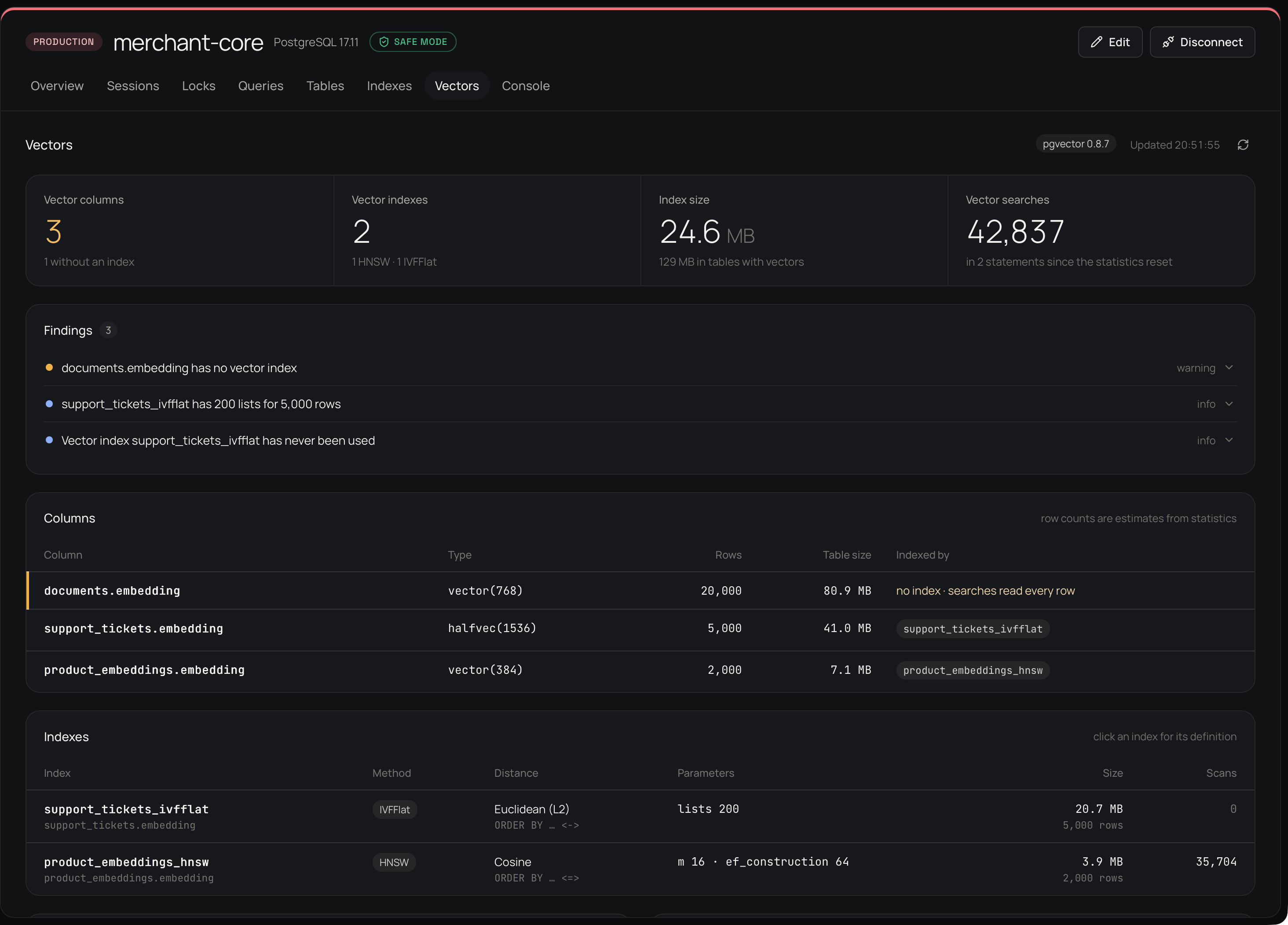
Native Workspace capture with synthetic fintech data and pgvector 0.8.7, captured on 10 October 2026. It illustrates the inspection workflow; its counts and findings are not a measurement of your system.
2. Match the distance and operator
In Indexes, compare Method, Distance and the ORDER BY operator with the query you run. Click the index row to inspect its definition.
<=>is cosine distance.<->is Euclidean (L2) distance.<#>is negative inner product, so ascending order still finds the largest inner products.
For example, this query uses cosine distance and requests a bounded nearest-neighbour result:
SELECT id, embedding <=> '[0.1, 0.2, 0.3]'::vector AS distance
FROM public.documents
ORDER BY embedding <=> '[0.1, 0.2, 0.3]'::vector
LIMIT 10;
The three-dimensional vector and table above are illustrative. Substitute the actual table, dimension and query vector from your application. A cosine query needs a compatible cosine index operator class; an L2 index is not interchangeable with it.
3. Read settings and usage together
Inspect Search settings alongside the index parameters. HNSW exposes settings such as hnsw.ef_search; IVFFlat uses settings such as ivfflat.probes. Recern shows values for its monitoring connection. An application can use different session settings, so check that application's connection as well.
Scans is a usage counter, not a recall score. A zero count can mean the index has not been used since statistics were reset; it does not prove that the index is unusable. A small table may also be cheaper to scan exactly. When pg_stat_statements is available, Vector queries helps identify the statements and their recorded cost.
4. Confirm a plan before changing anything
In your database's query-analysis workflow, inspect the plan for the actual bounded query. Plain EXPLAIN does not execute the query:
EXPLAIN (COSTS ON)
SELECT id
FROM public.documents
ORDER BY embedding <=> '[0.1, 0.2, 0.3]'::vector
LIMIT 10;
Use the real identifiers and vector dimensions here too. Check whether PostgreSQL chooses the intended index and operator. Leave EXPLAIN ANALYZE, index creation and settings changes for a separately reviewed test: they can execute work or change the database.
What you should have now
You can name the column, the matching index and distance operator, the relevant session settings and whether the application's plan uses that index. If the plan still chooses a scan, investigate table size, filters, statistics, casts and query shape before concluding that the index is broken.
Recern's pgvector view inspects indexes and usage. Recall measurements in Workspace apply to Recern Vector files, not to pgvector indexes.
Continue with PostgreSQL views or find a blocking session.
Reference: the pgvector project explains distance operators and index queries.